We use cookies to make your experience better.
To comply with the new e-Privacy directive, you agree to the privacy policy and our use of cookies.

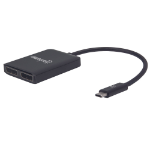
Manhattan 152952 USB graphics adapter 3840 x 2160 pixels Black
SKU
152952

Login for pricing
Out of stock
USB-C to Dual DisplayPort Adapter, USB-C to 2x DisplayPorts, MST Hub, UHD 4K@30Hz, Mirror, Extended and Video-Wall Modes Supported, Male to Females, Cable 19.5cm, Black
UNSPSC: 43201401
- Supports 4K@30Hz (Ultra-High-Definition, UHD) resolution, full 3D video and Deep colour
- Supports Mirror, Extended or Video-Wall modes
- Mirror mode duplicates the computer screen onto the connected displays
- Extended mode expands the desktop workspace onto the connected displays
- Video-wall mode uses two screens as one for a more immersive experience; requires a graphics card that supports Video-Wall function
- Mac OS X supports Mirror mode on up to two displays and Extended mode only on one display
- Plug and Play; requires no external power supply
- Three-year warranty
| SKU | 152952 |
|---|---|
| EAN | 0766623152952 |
| Manufacturer | Manhattan |
| Availability | In Stock |
Easily distribute a single Ultra-High-Definition (UHD) signal to two displays.
The Manhattan USB-C to Dual DisplayPort Adapter - MST Hub establishes a fast, simple and convenient link between a newer USB type-C-equipped media source (e.g., computer, tablet, smartphone, etc.) and up to two existing DisplayPort (DP) displays. Using DP Alt Mode technology, the adapter perfectly translates an audio/video signal from a single USB-C source into DisplayPort format (up to 4k@30Hz, UHD) and streams it simultaneously to one or two connected displays.
Flexible Solution for Many A/V Applications
Ideal for trade shows, classrooms, video conferencing, presentations, office and retail applications, the Manhattan USB-C to Dual DisplayPort Adapter - MST Hub perfectly distributes a synchronous signal in either Mirrored or Extended modes to the connected displays. The included MST feature can create a video wall from the two displays, offering a more immersive experience whether in a gaming session, in a conference room or at the home office.
Quality Construction and Easy Installation
Full compliance with DisplayPort, USB-C and HDCP standards ensures that the Manhattan USB-C to Dual DisplayPort Adapter - MST Hub can provide years of superior service and reliable performance. Setup is easy: simply connect the DP cables (not included) to the adapter and plug its USB-C connector into your device. That's all that's needed to complete this affordable, dual-UHD-display solution - no software/hardware configuration or complicated settings required.
The Manhattan USB-C to Dual DisplayPort Adapter - MST Hub establishes a fast, simple and convenient link between a newer USB type-C-equipped media source (e.g., computer, tablet, smartphone, etc.) and up to two existing DisplayPort (DP) displays. Using DP Alt Mode technology, the adapter perfectly translates an audio/video signal from a single USB-C source into DisplayPort format (up to 4k@30Hz, UHD) and streams it simultaneously to one or two connected displays.
Flexible Solution for Many A/V Applications
Ideal for trade shows, classrooms, video conferencing, presentations, office and retail applications, the Manhattan USB-C to Dual DisplayPort Adapter - MST Hub perfectly distributes a synchronous signal in either Mirrored or Extended modes to the connected displays. The included MST feature can create a video wall from the two displays, offering a more immersive experience whether in a gaming session, in a conference room or at the home office.
Quality Construction and Easy Installation
Full compliance with DisplayPort, USB-C and HDCP standards ensures that the Manhattan USB-C to Dual DisplayPort Adapter - MST Hub can provide years of superior service and reliable performance. Setup is easy: simply connect the DP cables (not included) to the adapter and plug its USB-C connector into your device. That's all that's needed to complete this affordable, dual-UHD-display solution - no software/hardware configuration or complicated settings required.
| Performance | |
|---|---|
| USB version | 3.2 Gen 1 (3.1 Gen 1) |
| DVI output | No |
| HDMI output | No |
| DisplayPort output | Yes |
| Number of displays supported | 2 |
| DisplayPort version | 1.2 |
| Maximum resolution | 3840 x 2160 pixels |
| Certification | HDCP CE FCC RoHS2 |
| Design | |
| Product colour | Black |
| Housing material | Plastic |
| Weight & dimensions | |
| Width | 1.93" (49 mm) |
| Depth | 2.36" (60 mm) |
| Height | 0.472" (12 mm) |
| Weight | 1.73 oz (49 g) |
| Operational conditions | |
|---|---|
| Operating temperature (T-T) | 0 - 40 °C |
| Storage temperature (T-T) | -20 - 60 °C |
| Packaging content | |
| Manual | Yes |
| Technical details | |
| Compliance certificates | RoHS |
You may also be interested in
| Product |
Hot Product
Manhattan 152952 USB graphics adapter...
Login for pricing
|
 Lenovo USB 3.0 - DVI/VGA USB graphics...
Login for pricing
Lenovo USB 3.0 - DVI/VGA USB graphics...
Login for pricing
|
Popular
StarTech.com USB32HDDVII USB graphics...
Login for pricing
|
Bestseller
Siig JU-VG0211-S1 USB graphics adapter...
Login for pricing
|
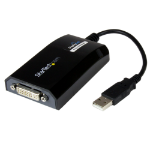 StarTech.com USB2DVIPRO2 USB graphics...
Login for pricing
StarTech.com USB2DVIPRO2 USB graphics...
Login for pricing
|
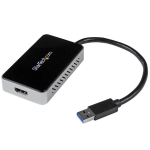 StarTech.com USB32HDEH USB graphics ad...
Login for pricing
StarTech.com USB32HDEH USB graphics ad...
Login for pricing
|
|---|---|---|---|---|---|---|
| SKU |
152952
|
0B47072
|
USB32HDDVII
|
JU-VG0211-S1
|
USB2DVIPRO2
|
USB32HDEH
|
| Manufacturer |
Manhattan
|
Lenovo
|
StarTech.com
|
Siig
|
StarTech.com
|
StarTech.com
|
| USB version |
3.2 Gen 1 (3.1 Gen 1)
|
N/A
|
3.2 Gen 1 (3.1 Gen 1)
|
N/A
|
2.0
|
3.2 Gen 1 (3.1 Gen 1)
|
| DVI output |
N
|
N/A
|
Y
|
N/A
|
Y
|
N
|
| DisplayPort output |
Y
|
N/A
|
N
|
N/A
|
N
|
N
|
| HDMI output |
N
|
N/A
|
Y
|
N/A
|
N
|
Y
|